4 Best Alternatives to Kdenlive in 2026
By Noahlast updated pricing verified

From our data: Two of Kdenlive's four listed alternatives (DaVinci Resolve and Shotcut) start at the same $0 price as Kdenlive itself, while the other two range from $9.99/month (CapCut Standard) to $22.99/month (Adobe Premiere Pro).
 DaVinci Resolve
 Shotcut
 Adobe Premiere Pro
 CapCut
How we picked
- Pricing for DaVinci Resolve and Adobe Premiere Pro was independently verified (2026-08-21), matching Kdenlive's own verified pricing from the same date; Shotcut's pricing was verified the same day, while CapCut's exact current pricing was not independently re-confirmed.
- Two of the four alternatives carry a verified external rating: DaVinci Resolve 4.8/5 from 272 Capterra reviews and Adobe Premiere Pro 4.7/5 from 573 Capterra reviews; Shotcut has a single 4/5 Product Hunt review, and CapCut has no external rating on file, though its own listing notes a 1.2/5 Trustpilot score driven by billing complaints.
- License model was compared against Kdenlive's own GPL-3.0, fully free status: Shotcut also carries a GPLv3 open-source license with no paid tier at all, while DaVinci Resolve is freemium with a paid Studio upgrade, Adobe Premiere Pro is subscription-only, and CapCut is freemium with paid Standard and Pro tiers.
- Ranking follows how directly each tool substitutes for Kdenlive's professional non-linear editing feature set (multi-track timeline, keyframeable effects, color grading): DaVinci Resolve and Shotcut are ordered first as free-tier professional-grade editors, followed by the subscription-only Adobe Premiere Pro, with CapCut last as a template-driven tool built for a different, short-form use case.
Paid placement never alters editorial rank — read the full methodology.
Kdenlive alternatives at a glance
| Alternative | Best for | Learning curve | Price |
|---|---|---|---|
| Kdenlivereference | independent video creators and hobbyists who want a full-featured, free video editor on Linux, Windows, or macOS without a subscription | Steep | Free |
| DaVinci Resolve | colorists and post-production editors who want node-based, Hollywood-grade color grading and a full VFX/audio suite without paying a monthly subscription | Steep | Free tier · paid from $295 one-time |
| Shotcut | hobbyist and independent video editors on Windows, macOS, or Linux who want a capable, no-cost editor that handles native footage formats without a conversion step | Moderate | Free |
| Adobe Premiere Pro | professional video editors and filmmakers who need frame-accurate multi-track editing, broadcast color grading, and Frame.io review workflows | Steep | Free tier · paid from $22.99/mo |
| CapCut | social media creators and marketers making short-form video for TikTok, Reels, and YouTube Shorts who want templates and AI tools over a professional timeline | Low | Free tier · paid from $9.99/mo |
 Kdenlive
1DaVinci Resolve — best Kdenlive alternative for colorists and post-production editors who want node-based, Hollywood-grade color grading and a full VFX/audio suite without paying a monthly subscription
DaVinci Resolve is the best Kdenlive alternative for colorists and post-production editors who want node-based, Hollywood-grade color grading bundled with editing, visual effects (Fusion), and audio mixing (Fairlight) in one free application, matching Kdenlive's own $0 price at the entry level. The free version supports professional editing and grading up to Ultra HD at 60fps in 8-bit, and DaVinci Resolve Studio costs $295 as a one-time purchase, not a subscription, adding the Neural Engine AI tools, 10-bit video up to 120fps, and advanced noise reduction that Kdenlive's feature set doesn't include. DaVinci Resolve holds a 4.8/5 rating from 272 Capterra reviews, a verified external rating Kdenlive's own listing doesn't have on file. Kdenlive is still the better choice for editors who want a familiar, layer-based timeline with zero learning curve investment in a new paradigm: DaVinci Resolve's node-based, multi-page workflow has a steep learning curve for editors coming from layer-based tools, and it recommends at least 16GB of RAM, so it can lag on the kind of modest hardware Kdenlive is more commonly run on.
Compared to Kdenlive: node-based Hollywood-grade color grading plus Fusion VFX and Fairlight audio in one free app, a $295 one-time Studio upgrade for AI tools, 4.8/5 rating from 272 Capterra reviews
Wins:Node-based color grading page used industry-wide on major film and TV productions, deeper than Kdenlive's built-in color correction tools · Bundles Fusion (VFX and motion graphics) and Fairlight (audio mixing) pages alongside editing, in the same free application · 4.8/5 rating from 272 Capterra reviews, a verified external rating Kdenlive's listing doesn't carry
Loses:Node-based, multi-page workflow has a steep learning curve for editors coming from Kdenlive's more conventional timeline layout · Recommends at least 16GB of RAM; performance lags on underpowered systems more readily than Kdenlive · Advanced AI features and higher bit depths/frame rates are locked behind the $295 Studio upgrade, unlike Kdenlive where every feature is free
Pros
- Free version is fully professional-grade, not a crippled trial, supporting Ultra HD 60fps 8-bit editing and grading.
- Studio upgrade is a one-time $295 purchase with no recurring subscription.
- Node-based color grading is used industry-wide on film and TV productions.
- Native support for Windows, macOS, and Linux in a single application.
Cons
- Steep learning curve for editors transitioning from layer-based tools like Premiere Pro.
- Recommends at least 16GB of RAM; performance lags on underpowered systems.
- Project database and media management model confuses users coming from simpler NLEs.
- Advanced AI features (Neural Engine) and higher bit depths/frame rates are locked behind the $295 Studio upgrade.
Pricing: Free tier · paid from $295 one-time — Free tier matches Kdenlive's $0; Studio upgrade is a $295 one-time purchase for features Kdenlive doesn't offer (verified )
2Shotcut — best Kdenlive alternative for hobbyist and independent video editors on Windows, macOS, or Linux who want a capable, no-cost editor that handles native footage formats without a conversion step
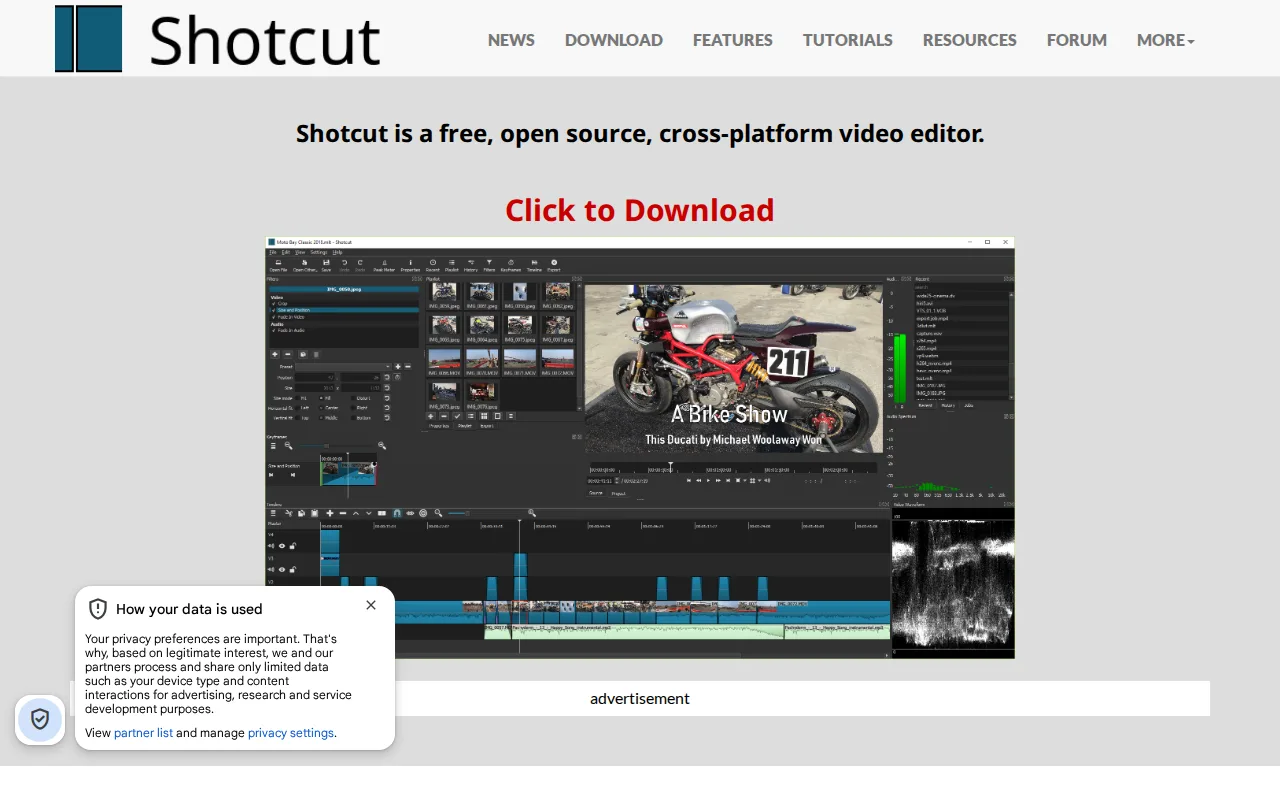
Shotcut is the best free Kdenlive alternative for editors who want native FFmpeg-based format support, letting hundreds of audio and video formats be edited directly on the timeline without a separate conversion step, matching Kdenlive's own $0 price under a comparable open-source license. Shotcut is licensed under GPLv3 (Kdenlive uses GPL-3.0), with no paid tier, in-app purchases, or subscription of any kind, and its GitHub repository has accumulated roughly 15,000 stars with new releases roughly every two months. Beyond basic cutting, Shotcut includes screen, webcam, and audio capture, 4K editing, and Blackmagic Design SDI/HDMI output for professional external monitoring, features that extend past Kdenlive's own toolset in a few specific areas. Kdenlive is still the better choice for editors who want proxy editing for large 4K+ footage and title/text generation built in as a mainstream workflow: Shotcut's interface and stability are described as less polished than commercial editors, and unlike Kdenlive it has no color-grading tools as advanced as DaVinci Resolve's node-based system, so serious color work still favors switching tools entirely.
Compared to Kdenlive: native FFmpeg support for hundreds of formats without a conversion step, screen/webcam capture and Blackmagic SDI/HDMI output, both free and GPL-licensed like Kdenlive itself
Wins:Native FFmpeg-based format support lets hundreds of audio and video formats be edited directly on the timeline without converting them first · Includes screen, webcam, and audio capture alongside standard editing tools, beyond Kdenlive's core toolset · Blackmagic Design SDI and HDMI output support professional external monitoring
Loses:No color-grading tools as advanced as DaVinci Resolve's node-based system, and less depth than Kdenlive's own color correction in some workflows · Interface and stability are described as less polished than commercial editors, a complaint similar to Kdenlive's own noted stability issues on large projects · No official paid support channel; help comes from community forums and documentation, the same limitation Kdenlive shares
Pros
- Completely free with no paid tier, ads, or watermark, under the GPLv3 license.
- Native FFmpeg support edits hundreds of formats directly without a conversion step.
- Actively maintained with new releases roughly every two months and about 15,000 GitHub stars.
- Includes screen, webcam, and audio capture alongside standard editing tools.
Cons
- No official paid support channel; help comes from community forums and documentation.
- Interface and stability are less polished than commercial editors like Premiere Pro or DaVinci Resolve.
- No color-grading tools as advanced as DaVinci Resolve's node-based system.
- No web or mobile version; desktop-only on Windows, macOS, and Linux.
Pricing: Free — Free, matching Kdenlive's $0 price under a comparable GPL license (verified )
3Adobe Premiere Pro — best Kdenlive alternative for professional video editors and filmmakers who need frame-accurate multi-track editing, broadcast color grading, and Frame.io review workflows

Adobe Premiere Pro is the best Kdenlive alternative for professional video editors and filmmakers who need frame-accurate multi-track editing, broadcast color grading, and Frame.io review workflows, at the cost of Kdenlive's free, donation-funded model. The single-app plan starts at $22.99/month billed annually, a real ongoing cost against Kdenlive's $0 price, but adds text-based editing and Media Intelligence that let editors search and cut footage by transcript, plus Generative Extend, which adds frames or ambient sound to a clip using AI, capabilities Kdenlive's feature set doesn't include. Adobe Premiere Pro holds a 4.7/5 rating from 573 Capterra reviews, a verified sample Kdenlive's own listing doesn't have on file. Kdenlive is still the better choice for editors who want to avoid subscription lock-in entirely: Premiere Pro has no perpetual license option, cancelling an annual-billed-monthly plan within the first year can trigger an early termination fee tied to Adobe's 2024 $150 million FTC settlement, and it's demanding on CPU/GPU for multi-cam or high-resolution footage, costs and risks Kdenlive's free, donation-funded model never carries.
Compared to Kdenlive: text-based editing and Media Intelligence for transcript-based cuts, Frame.io integration for client review, but $22.99/month subscription vs Kdenlive's $0 with no perpetual option
Wins:Text-based editing and Media Intelligence speed up rough cuts by searching footage like a transcript, a workflow Kdenlive doesn't offer · Frame.io integration streamlines client review and approval directly from the timeline · 4.7/5 rating from 573 Capterra reviews, a verified external rating Kdenlive's listing doesn't carry
Loses:$22.99/month ongoing subscription cost vs Kdenlive's $0 price with no paid tier at all · No perpetual-license option; access stops the moment the subscription lapses, unlike Kdenlive's permanently free license · Cancelling an annual-billed-monthly plan within the first year can trigger an early termination fee tied to Adobe's 2024 $150 million FTC settlement
Pros
- Multi-track timeline and Color Mode grading tools built for professional finishing work.
- Text-based editing and Media Intelligence speed up rough cuts by searching footage like a transcript.
- Frame.io integration streamlines client review and approval directly from the timeline.
- Tight integration with After Effects and Audition for motion graphics and audio finishing.
Cons
- Steep learning curve; overkill for short-form social content compared to template-driven editors.
- Demanding on CPU/GPU, especially with multi-cam or high-resolution footage.
- Subscription-only, and cancelling an annual-billed-monthly plan within the first year can trigger an early termination fee.
- No perpetual license option for editors who prefer a one-time purchase.
Pricing: Free tier · paid from $22.99/mo — $22.99/month single-app plan vs Kdenlive's $0 (verified )
4CapCut — best Kdenlive alternative for social media creators and marketers making short-form video for TikTok, Reels, and YouTube Shorts who want templates and AI tools over a professional timeline
CapCut is the best Kdenlive alternative for social media creators and marketers who want a large library of trending templates, auto-captioning, and AI voiceover for TikTok, Reels, and YouTube Shorts, rather than Kdenlive's professional timeline-based workflow. CapCut's free plan covers a full basic toolkit, multi-track editing, and 1080p export, matching Kdenlive's own $0 price at that tier, though templates and effects marked Pro export with a watermark unless upgraded to Standard (about $9.99/month) or Pro ($19.99/month, unlocking 4K export and the full AI toolkit). CapCut runs on desktop, web, and mobile with projects syncing across devices, a broader platform spread including mobile that Kdenlive's desktop-only application doesn't match. Kdenlive is still the better choice for editors who want a genuinely unlimited, watermark-free free tier and no billing risk: CapCut carries a 1.2/5 Trustpilot TrustScore driven largely by billing and subscription-cancellation complaints, and Pro-marked templates and 4K export require a paid subscription, while every one of Kdenlive's features, including unlimited export resolution, is free and unlocked from install.
Compared to Kdenlive: mobile, web, and desktop apps with syncing projects and AI auto-captioning, free tier matches Kdenlive's $0 at 1080p, but a 1.2/5 Trustpilot score and Pro-gated 4K export vs Kdenlive's fully free unlimited export
Wins:Runs on desktop, web, and mobile with projects syncing across devices, a broader platform spread than Kdenlive's desktop-only app · Auto-captioning and AI voiceover save real editing time for solo creators making short-form content · Large, constantly refreshed template and effects library tuned specifically for social platforms
Loses:1.2/5 Trustpilot TrustScore reflects widespread billing and cancellation complaints, a risk Kdenlive's free, no-account model doesn't carry · Templates and effects marked Pro export with a watermark unless subscribed, unlike Kdenlive where every feature is free and unwatermarked · 4K export and the full AI toolkit require the $19.99/month Pro plan, while Kdenlive's export resolution has no limit at any price
Pros
- Free tier covers a genuinely usable multi-track editor, not just a stripped-down demo.
- Large, constantly refreshed template and effects library tuned for social platforms.
- Auto-captioning and AI voiceover save real editing time for solo creators.
- Available on desktop, web, and mobile with projects that sync across devices.
Cons
- 1.2/5 Trustpilot TrustScore reflects widespread billing and cancellation complaints.
- Templates and effects marked Pro export with a watermark unless subscribed.
- 4K export and the full AI toolkit require the Pro plan, not just Standard.
- Pricing varies by platform and region, and buying through the iOS App Store can cost more than through CapCut's own site.
Pricing: Free tier · paid from $9.99/mo — Free tier (1080p, watermarked Pro templates) matches Kdenlive's $0; Pro at $19.99/month for 4K export Kdenlive includes free (verified )
Which one is right for you?
- You need professional node-based color grading and a full VFX/audio suite for freeDaVinci Resolve
- You want a free, open-source editor that handles native footage formats without converting firstShotcut
- You're a professional editor who wants AI-assisted transcript-based editing and client review toolsAdobe Premiere Pro
- You're making short-form content for TikTok, Reels, or YouTube Shorts on your phoneCapCut
- You want to avoid any subscription lock-in and keep every feature free and unlockedShotcut
- You need Blackmagic SDI/HDMI output for professional external monitoring on a free editorShotcut
Frequently asked questions
Is there a free alternative to Kdenlive?
- Yes. DaVinci Resolve, Shotcut, and CapCut all offer free tiers or are entirely free, though DaVinci Resolve's advanced AI tools and CapCut's 4K export and Pro templates require a paid upgrade.
What is the closest alternative to Kdenlive?
- Shotcut is the closest alternative to Kdenlive, since both are entirely free, GPL-licensed, open-source video editors with no paid tier, watermark, or export limit of any kind.
Can DaVinci Resolve replace Kdenlive?
- DaVinci Resolve can replace Kdenlive and adds professional node-based color grading, Fusion VFX, and Fairlight audio mixing for free, but its multi-page, node-based workflow has a steeper learning curve than Kdenlive's more conventional timeline.
Which Kdenlive alternative is best for short-form social video?
- CapCut is the best Kdenlive alternative for short-form social video, offering trending templates, auto-captioning, and AI voiceover built for TikTok, Reels, and YouTube Shorts, though its Pro tier at $19.99/month is required for 4K export and watermark-free Pro templates.
Is Adobe Premiere Pro better than Kdenlive?
- Adobe Premiere Pro adds text-based editing, Media Intelligence, and Frame.io review workflows Kdenlive doesn't offer, but it costs $22.99/month with no perpetual-license option, against Kdenlive's $0 price with every feature free.
Which Kdenlive alternative has the best rating?
- DaVinci Resolve holds the highest verified rating among Kdenlive's alternatives at 4.8/5 from 272 Capterra reviews, ahead of Adobe Premiere Pro's 4.7/5 from 573 reviews; Kdenlive itself has no external rating on file.